How can I see how much electricity I used on my bill?
You can see your monthly electricity usage on your bill by signing into "My Account" or through the NES mobile app. Select “Your Statement Details.” You can also compare this bill to previous months and this time last year in the “Your Energy Summary” bar chart.
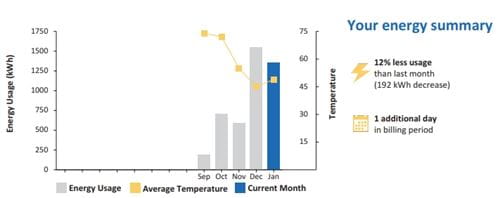 Example "Your Energy Use" bar chart
 -
My Account
Sign in to My Account to pay your bill, download bills, and make changes with ease.
-
AutoPay
- AutoPay through Paymentus is now available, whether or not you choose to enroll in e-bill! Log in to My Account, click on "AutoPay" under "Enrollments", and follow the prompts. Never worry about missing a due date again! (e-check only). *Customers previously enrolled in NEAT have been moved to AutoPay.
-
Pay OnlinePay your bill with Apple Pay, PayPal, Venmo, debit/credit card, or checking account; no login required. You will need your 10-digit NES account number. The service provider charges a convenience fee of $2.25.
-
Pay by PhoneCall 615-736-6900 and follow the prompts, 24 hours a day, 7 days a week. Pay your bill with a card or checking account. You will need your 10-digit NES account number. The service provider charges a convenience fee of $2.25. Payments post to your account immediately.
-
Pay by MailPlease include the bill stub with your check or money order and mail in the envelope provided. Send payments to Nashville Electric Service, P O Box 305099, Nashville, TN 37230-5099.
-
Pay in Person
- In Your Neighborhood: Pay your bill with cash through our Scan to Pay option at various retailers. Simply click the one-time payment link to receive a barcode via SMS (message and data rates may apply) or email. You will need your 10-digit NES account number. The service provider charges a $2.95 convenience fee. Payments made using a barcode will be processed in real-time. No need to call in.
- At a Self-Service Kiosk: You can now pay your bill with cash (without a fee), card or e-check 24x7 at one of our user-friendly payment kiosks, located outside our main office and Enbright Credit Union branch locations: 2340 Jackson Downs Boulevard in Donelson or in Hendersonville at 270 Indian Lake Boulevard. The service provider charges a $2.25 convenience fee for e-check and card payments. Payments will post immediately.
- At NES: Our friendly tellers are available in the customer lobby located at 1214 Church Street, Monday through Friday from 8 a.m. to 4 p.m. Pay in cash, check or money order. Sorry, card payments are not accepted.
-
Please note: If your payment is to reconnect your service after disconnection, to avoid any damage that may result upon power restoration, please ensure that appliances or devices at the premises are turned off before consenting to power restoration. NES is not liable or responsible for any loss, injury, or property damage resulting from power restoration. Reconnect fees will apply (after-hours reconnection will result in a higher fee).

Bill Pay Programs
NES offers several programs to make it easy to manage your monthly bills. Choose what’s right for you.
FAQs
What if I can’t pay my bill?
We are here to support you during this time. Several special billing options were created to help manage finances. Customer Relations 615-736-6900 will work with you to see what works best for your situation.
- Flexible Payment Arrangements: Following Winter Storm Fern, you can set up unlimited payment arrangements through December 2026. This is a significant departure from our standard policy, designed to give you the time you need to manage your finances.
-
Metro Action Commission: If you live in Davidson County, apply for energy assistance at www.nashville.gov/mac or call 615-862-8860 for more information.
Mid-Cumberland Community Action Agency: visit www.midcumberland.org or contact the county outreach office in which you live for more information by calling 615-742-1113
- Cheatham County ext. 9400
- Robertson County ext. 7400
- Rutherford County ext. 7500
- Sumner County ext. 8300
- Williamson County ext. 9400
- Wilson County ext. 9500
Nothing has changed in my home. Why is my bill higher this month?
When the outdoor temperature is much colder or hotter than the temperature you set inside your home, it takes more energy to stay comfortable. During very cold weather, your heating system has to work harder and may switch to auxiliary or emergency heat, which is less efficient and more expensive to use.
Think of it like riding a bike uphill. You’re still pedaling at the same pace, but it takes more effort. In extreme temperatures, even if your thermostat setting hasn’t changed, the amount of electricity (kWh) needed to maintain that setting has.
Find out more about Understanding Your NES Bill. The increased kWhs are multiplied by the Energy Charge & TVA Fuel Cost Adjustment. More information about Rates
What can I do to reduce my bill going forward?
- See how to make your home energy-efficient at Energy Saving Tips and rebates for homes and businesses at Manage My Energy
- Sign up for Budget Billing. Budget Billing sets fixed monthly payments based on last year's usage and is reviewed regularly to avoid an unexpected year-end settlement.
Will I be charged for the days I experienced an outage?
No. Your bill is based on the electricity used at your home. When the power is out, no electricity is used during that period. If you want to know more, you can call Customer Relations at 615-736-6900
.
Metro Action Commission: If you live in Davidson County, apply for energy assistance at www.nashville.gov/mac or call 615-862-8860 for more information.
Mid-Cumberland Community Action Agency: visit www.midcumberland.org or contact the county outreach office in which you live for more information by calling 615-742-1113
- Cheatham County ext. 9400
- Robertson County ext. 7400
- Rutherford County ext. 7500
- Sumner County ext. 8300
- Williamson County ext. 9400
- Wilson County ext. 9500